This is an old revision of the document!
AI Configuration
AI Feature Configuration: Chatbot Assistant and Content Generation
To activate the AI chatbot and the content generation feature in Stages, the following steps are required. The content generation feature needs to be configured to use the chatbot feature. The chatbot feature configuration is arbitrary - the content generation feature can be used without the chatbot feature.
Stages version
The chatbot will only work with Stages v7.12 or higher. The content generation feature works with Stages v7.11 or higher.
Metamodel
A new unified configuration metamodel for Stages v7.12 / v.7.11 is required to support the AI features. Please contact stages-support@ul.com for further metamodel update instructions - depending on your Stages version and server operating system. If you use a customized metamodel, please contact your Stages product consultant to extend your metamodel.
User permissions
Depending on the activities performed by the Stages user with the chatbot assistant - the following user permissions are required:
- Use chatbot assistant:
- Permission Domain Chatbot > Permission: Read
- Permission Domain Workspace > Permission Read
- Configure chatbot assistant:
- Permission Domain AI Administration > Permissions: RCMD
- Permission Domain Workspace > Permission: Read
Modify config.xml settings
Please add the following section to your file config.xml.
- Default file path on windows server: /methodpark/stages/conf/config.xml
- Default file path on linux server: /opt/stages/conf/config.xml
AI Chatbot Assistant feature:
<chatbot>
    <chatbot-stage ident="training">
        <chatbot-step ident="index" type="azureOpenAI" host="text-embedding-3-large">
            <chatbot-property name="nThreads" value="32"></chatbot-property>
            <chatbot-property name="chunkSize" value="20"></chatbot-property>
            <chatbot-property name="maxChunkSizeInChars" value="512"></chatbot-property>
            <chatbot-property name="maxOverlapSizeInChars" value="30"></chatbot-property>
            <chatbot-property name="retryBaseDelay" value="3"></chatbot-property>
            <chatbot-property name="retryMaxRetries" value="20"></chatbot-property>
        </chatbot-step>
        <chatbot-step ident="summaries" type="azureOpenAI" host="gpt-4o-mini">
            <chatbot-property name="maxTokens" value="500"></chatbot-property>
            <chatbot-property name="maxWords" value="250"></chatbot-property>
            <chatbot-property name="chunkSize" value="100"></chatbot-property>
            <chatbot-property name="nThreads" value="32"></chatbot-property>
            <chatbot-property name="retryBaseDelay" value="3"></chatbot-property>
            <chatbot-property name="retryMaxRetries" value="20"></chatbot-property>
        </chatbot-step>
        <chatbot-step ident="communities" type="azureOpenAI" host="gpt-4o-mini">
            <chatbot-property name="maxContextTokens" value="72000"></chatbot-property>
            <chatbot-property name="chatMemoryContextProportion" value="0"></chatbot-property>
            <chatbot-property name="localContextProportion" value="0.25"></chatbot-property>
            <chatbot-property name="reportsContextProportion" value="0.75"></chatbot-property>
            <chatbot-property name="sourcesContextProportion" value="0"></chatbot-property>
            <chatbot-property name="acronymsContextProportion" value="0"></chatbot-property>
            <chatbot-property name="nThreads" value="32"></chatbot-property>
            <chatbot-property name="retryBaseDelay" value="3"></chatbot-property>
            <chatbot-property name="retryMaxRetries" value="20"></chatbot-property>
        </chatbot-step>
    </chatbot-stage>
    <chatbot-stage ident="query">
        <chatbot-step ident="language">
            <chatbot-property name="detectionMode" value="auto"></chatbot-property>
            <chatbot-property name="spokenLanguages"
                              value="en,es,fr,de,it,pt,zh,ja,ko,ru,hi,ar,nl,sv,no,da,fi,pl,tr,cs,el"></chatbot-property>
        </chatbot-step>
        <chatbot-step ident="acronyms">
            <chatbot-property name="caseSensitive" value="false"></chatbot-property>
        </chatbot-step>
        <chatbot-step ident="rewrite" type="azureOpenAI" host="gpt-4o"></chatbot-step>
        <chatbot-step ident="search" type="azureOpenAI" host="text-embedding-3-large">
            <chatbot-property name="maxHits" value="10"></chatbot-property>
            <chatbot-property name="name.boost" value="5.0"></chatbot-property>
            <chatbot-property name="name.k" value="10"></chatbot-property>
            <chatbot-property name="name.numCandidates" value="100"></chatbot-property>
            <chatbot-property name="name.similarity" value="0.2"></chatbot-property>
            <chatbot-property name="description.boost" value="1.0"></chatbot-property>
            <chatbot-property name="description.k" value="5"></chatbot-property>
            <chatbot-property name="description.numCandidates" value="100"></chatbot-property>
            <chatbot-property name="description.similarity" value="0.2"></chatbot-property>
        </chatbot-step>
        <chatbot-step ident="query" type="azureOpenAI" host="gpt-4o">
            <chatbot-property name="resultSize" value="10"></chatbot-property>
            <chatbot-property name="maxContextTokens" value="120000"></chatbot-property>
            <chatbot-property name="localContextProportion" value="0.38"></chatbot-property>
            <chatbot-property name="reportsContextProportion" value="0.25"></chatbot-property>
            <chatbot-property name="sourcesContextProportion" value="0.25"></chatbot-property>
            <chatbot-property name="chatMemoryContextProportion" value="0.1"></chatbot-property>
            <chatbot-property name="acronymsContextProportion" value="0.02"></chatbot-property>
            <chatbot-property name="maxChatMessages" value="10"></chatbot-property>
            <chatbot-property name="personalities"
                              value="engineer,processExpert,manager,novice,child"></chatbot-property>
        </chatbot-step>
    </chatbot-stage>
</chatbot>
AI Content Generation feature (Azure):
<cg>
    <cg-type name="azureOpenAI">
        <cg-host ident="openAI" url="${ai.model.url}" displayName="Azure OpenAI">
            <cg-property name="user" value="${ai.security.user}"/>
            <cg-property name="key" value="${ai.model.key}"/>
            <cg-property name="deployment_name" value="gpt-4o"/>
            <cg-property name="version" value="2024-05-01-preview"/>
            <cg-property name="costsPerInputToken" value="2.5"/>
            <cg-property name="costsPerOutputToken" value="10.0"/>
        </cg-host>
        <cg-host ident="gpt-4o-mini" url="${ai.model.url}" displayName="Azure OpenAI GPT-4o-mini">
            <cg-property name="user" value="${ai.security.user}"/>
            <cg-property name="key" value="${ai.model.key}"/>
            <cg-property name="deployment_name" value="gpt-4o-mini"/>
            <cg-property name="costsPerInputToken" value="0.15"/>
            <cg-property name="costsPerOutputToken" value="0.6"/>
            <cg-property name="logRequestsAndResponses" value="true"/>
        </cg-host>
        <cg-host ident="gpt-4o" url="${ai.model.url}" displayName="Azure OpenAI GTP-4o">
            <cg-property name="user" value="${ai.security.user}"/>
            <cg-property name="key" value="${ai.model.key}"/>
            <cg-property name="deployment_name" value="gpt-4o"/>
            <cg-property name="costsPerInputToken" value="2.5"/>
            <cg-property name="costsPerOutputToken" value="10.0"/>
            <cg-property name="logRequestsAndResponses" value="false"/>
        </cg-host>
        <cg-host ident="text-embedding-3-large" url="${ai.model.url}" displayName="Azure OpenAI Embedding-3-large">
            <cg-property name="user" value="${ai.security.user}"/>
            <cg-property name="key" value="${ai.model.key}"/>
            <cg-property name="deployment_name" value="text-embedding-3-large"/>
            <cg-property name="dimensions" value="512"></cg-property>
            <cg-property name="costsPerInputToken" value="0.13"/>
            <cg-property name="costsPerOutputToken" value="0"/>
            <cg-property name="isEmbeddingModel" value="true"/>
        </cg-host>
    </cg-type>
</cg>
AI content generation feature (OpenAI compatible):
Stages 7.12.4 and later can be configured to use a LLM and embedding model that are hosted outside of Azure, e. g. by the customers themselves. We currently support installations that use an API that is compatible to that of OpenAI. The configuration is similar, but differs in which properties are available.
Important differences to Azure:
- the cg-type.name “openAICompatible”
- A custom tokenizer configuration is required
- If run on consumer hardware, it will probably be necessary to increase the default timeout.
<cg>
    <cg-type name="openAICompatible">
        <cg-host ident="local-llm-small" url="${ai.model.url}" displayName="Small self Hosted LLM">
            <cg-property name="deployment_name" value="self-hosted-small-llm-name"/>
            <cg-property name="key" value="api-key"/>
            <cg-property name="tokenizerFolder" value="small-tokenizer-name"/>
            <cg-property name="maxTokens" value="10000"/>
            <cg-property name="timeoutInMinutes" value="10"/>
        </cg-host>
        <cg-host ident="local-llm" url="${ai.model.url}" displayName="Large self Hosted LLM">
            <cg-property name="deployment_name" value="self-hosted-large-llm-name"/>
            <cg-property name="key" value="api-key"/>
            <cg-property name="tokenizerFolder" value="large-tokenizer-name"/>
            <cg-property name="maxTokens" value="40000"/>
            <cg-property name="timeoutInMinutes" value="10"/>
        </cg-host>
        <cg-host ident="local-embedding" url="${ai.model.url}" displayName="Self Hosted Embedding">
            <cg-property name="deployment_name" value="self-hosted-embedding-model-name"/>
            <cg-property name="key" value="api-key"/>
            <cg-property name="isEmbeddingModel" value="true"/>
            <cg-property name="timeoutInMinutes" value="10"/>
        </cg-host>
    </cg-type>
</cg>
The ai.model.url typically ends in “/v1”, like this:http://123.45.67.89:12345/v1
AI translate feature configuration:
Version
The API of the AI Translator has the version 3.0 and will be set like following: <cg-property name=“version” value=“3.0”/>
Request Type
The request type differs depending on the type of connection you’re using to the service.
For globally accessible services the configuration is:
<cg-property name="request_type" value="translate"/>
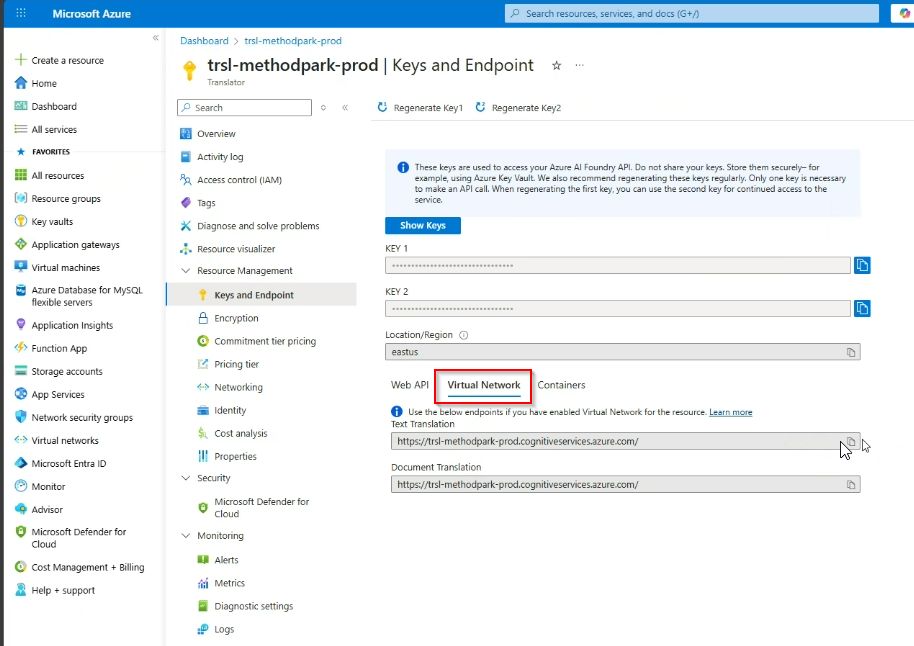
For virtual network access (mind the v in front of 3.0):
<cg-property name="request_type" value="translator/text/v3.0/translate"/>
Region
The region is an optional header. If the region property is not set, the translate service requests a translation from the closest available data centre. As we provide our services in Europe and USA only, there are just a few possible combinations for our configuration. <cg-property name=“region” value=“eastus”/>
<cg>
    <cg-type name="other_systems_go_here">
    </cg-type>
    <cg-type name="microsoftTranslateService">
        <cg-host ident="translateService" url="${ai.translateservice.url}"
                 displayName="Microsoft Cognitive Services Translator">
            <cg-property name="user" value="${ai.security.user}"/>
            <cg-property name="key" value="${ai.translateservice.key}"/>
            <cg-property name="version" value="3.0"/>
            <cg-property name="request_type" value="translate"/>
            <!-- if using a virtual network configuration the request type has to be like following -->
            <!-- <cg-property name="request_type" value="translator/text/v3.0/translate"/> -->
        </cg-host>
    </cg-type>
</cg>
Modify secret.properties settings
Please add the following section to your secret.properties file and replace the url and key values with your personal Azure AI subscription data. Details on the subscriptions required can be found here: Stages AI Data Privacy
- Default file path on windows server: /methodpark/stages/conf/secret.properties
- Default file path on linux server: /opt/stages/conf/secret.properties
ai.model.url = [azure_ai_ressource_url]
ai.model.key = [azure_ai_ressource_key]
ai.security.user = [custom_name_to_identify_stages_to_azure]
ai.translateservice.url = [azure_translate_service_url]
ai.translateservice.key = [azure_translate_service_key]
A / might be needed after the translate service URL while the AI model URL does not need one.
If you use Stages as managed service and you don't have an own AI subscription, please contact UL for an subscription offer.
Restart Stages service
Please stop the Stages service after saving the changes, run the update.bat or .sh script located under /methodpark/stages/bin/ and restart Stages.
AI Feature Configuration: How to create Azure OpenAI services
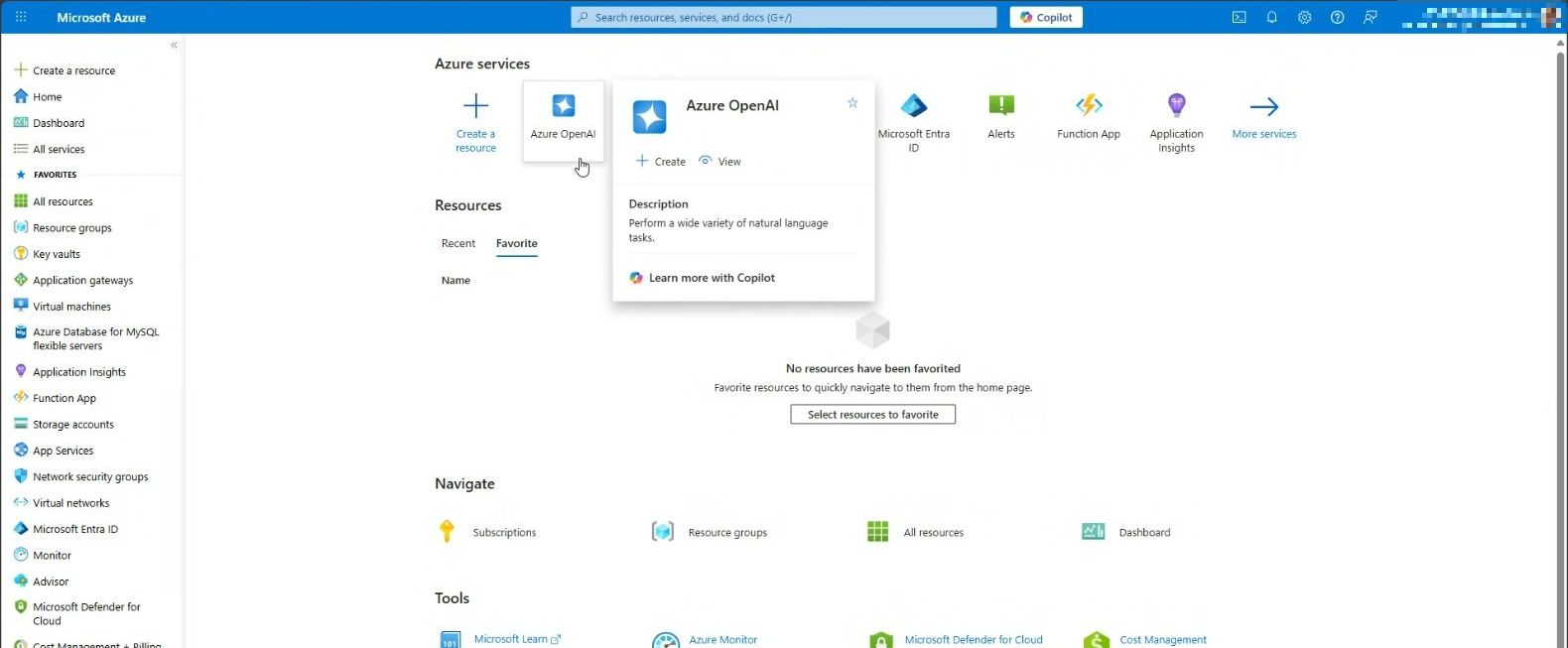
1. Login to Azure-Management-Portal and navigate to “Azure OpenAI” service:
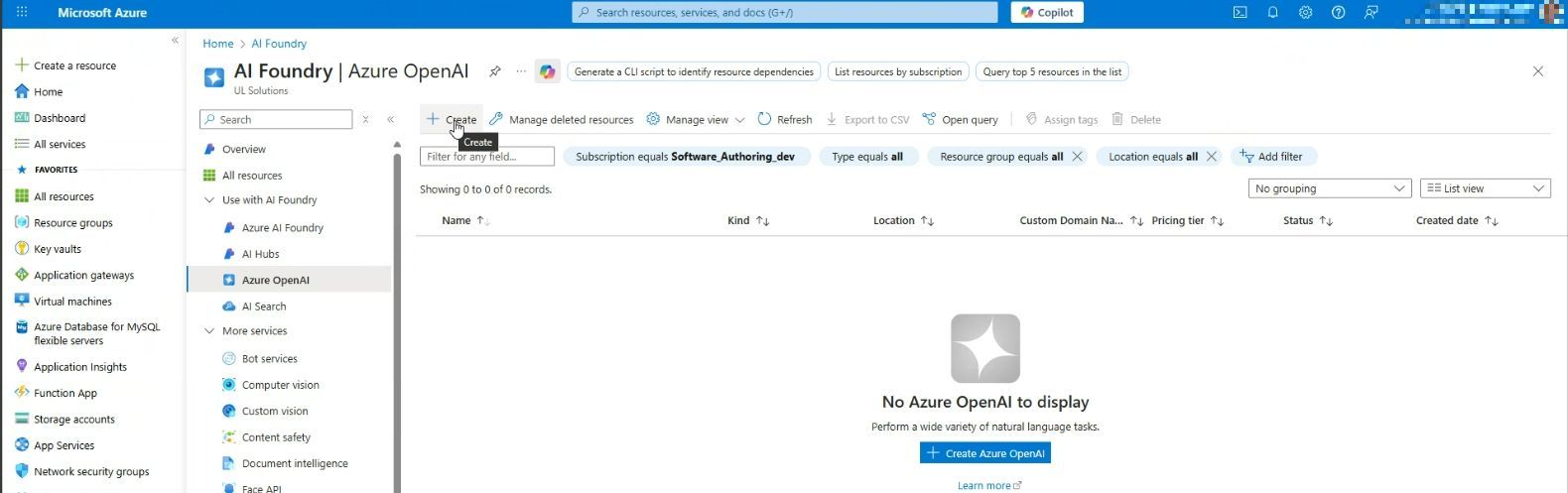
2. Create a new service within the OpenAI service:
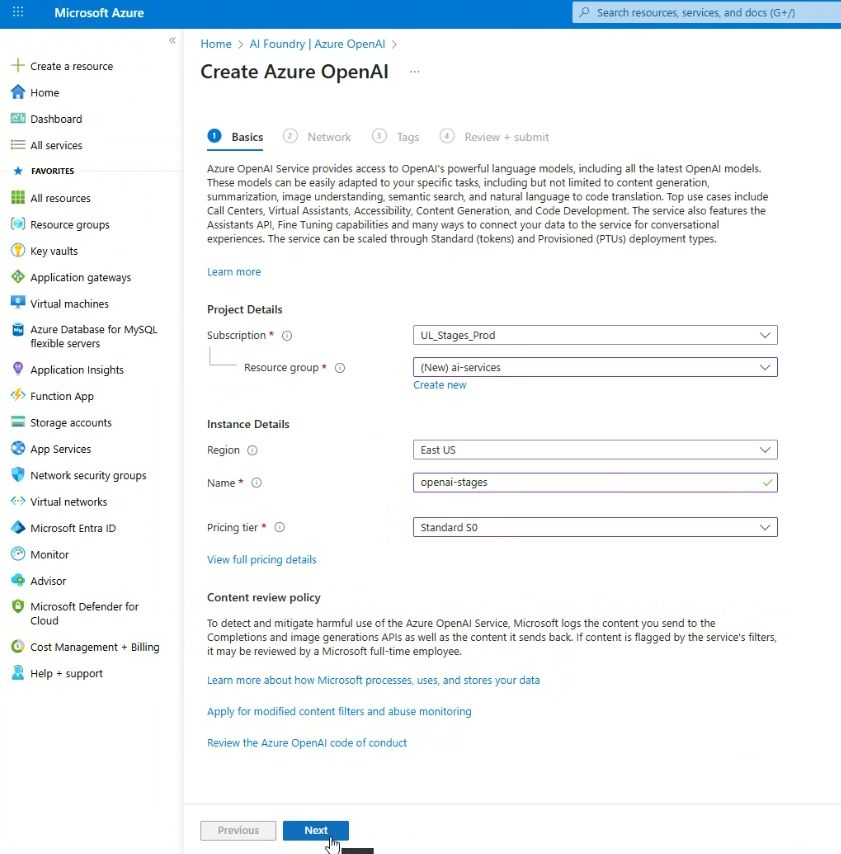
3. Define basic information for the resource - e.g. select region:
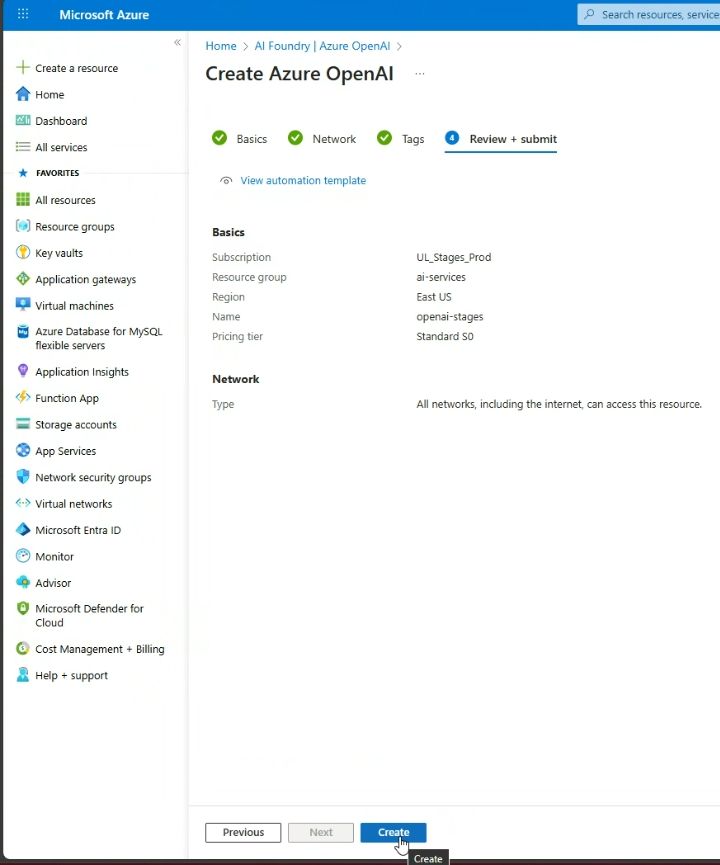
4. Create resource: click “Create”:
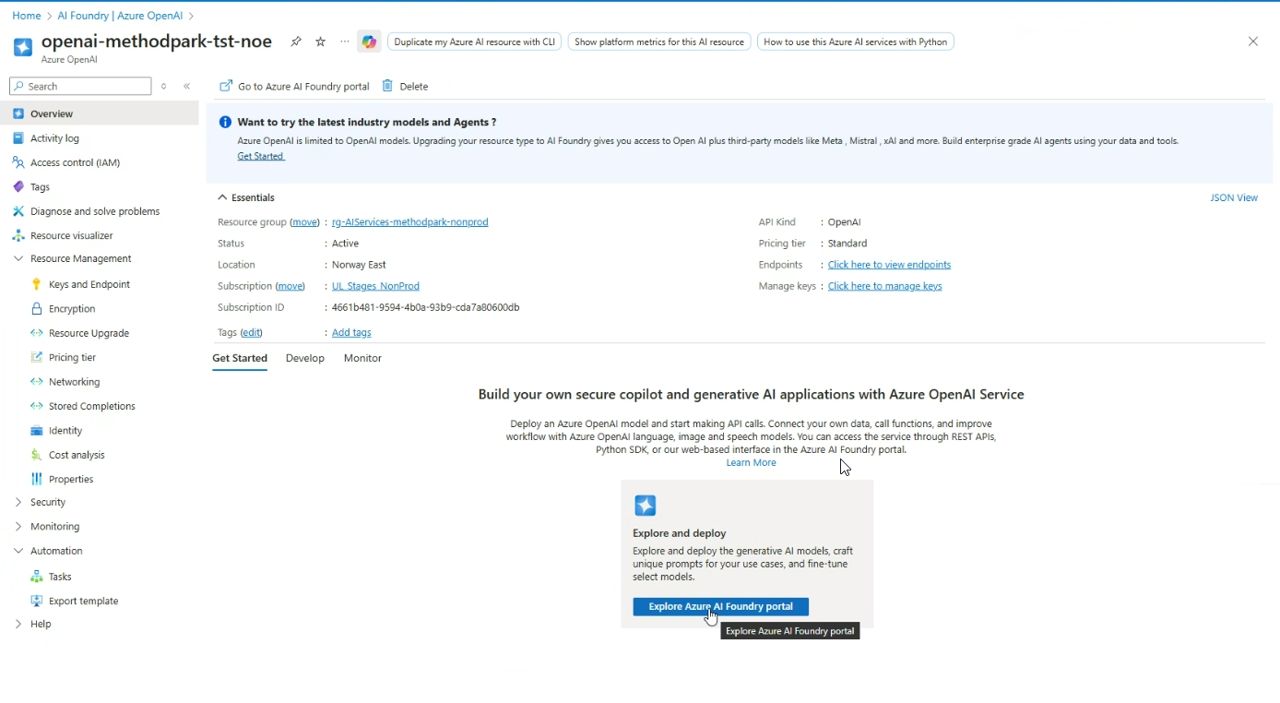
5. Select resource and navigate to “AI Foundry portal”. Required AI models need to be configured here:
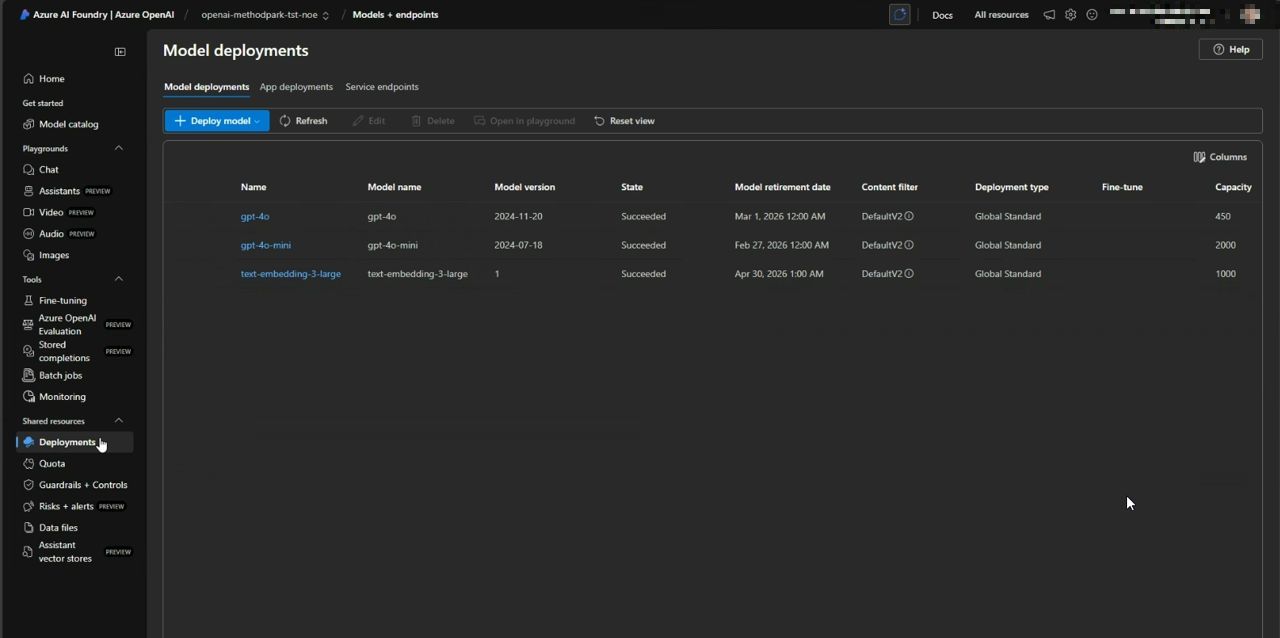
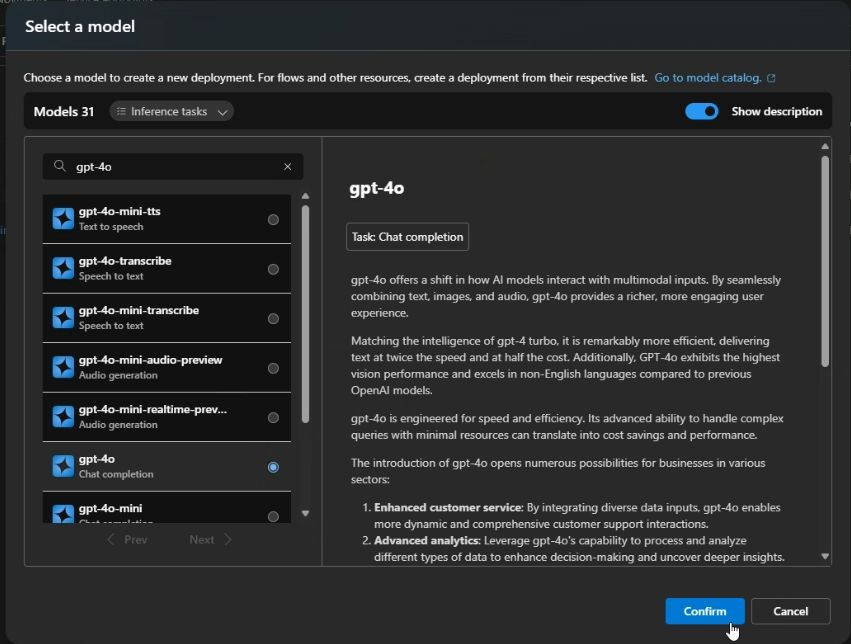
6. Within “AI foundry portal” these three models need to be deployed:
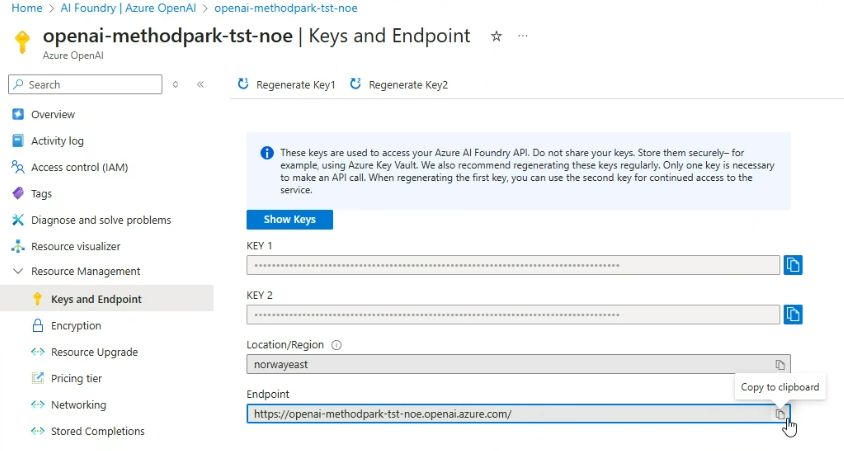
7. Within the resource navigate to “Keys and Endpoints”:
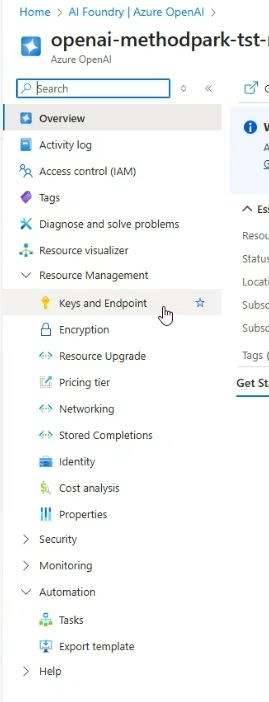
8. Here the required access data for Stages can be exported (URL, Key):
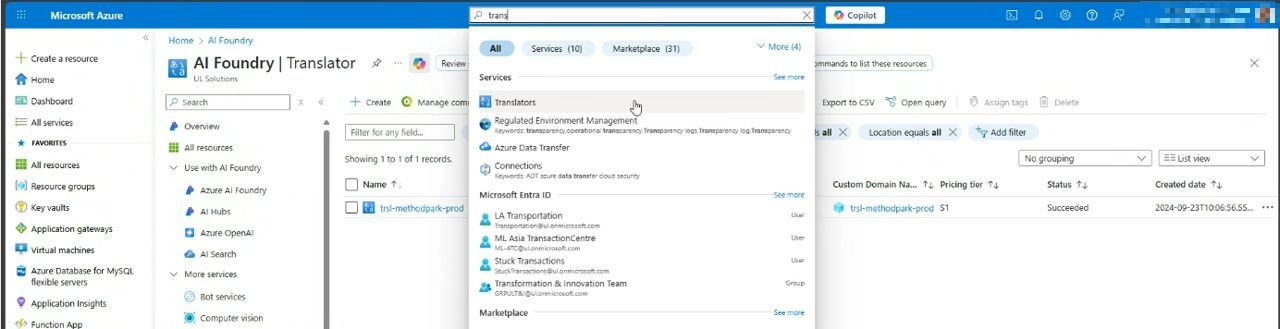
9. Afterwards create another resource for the translator-services:
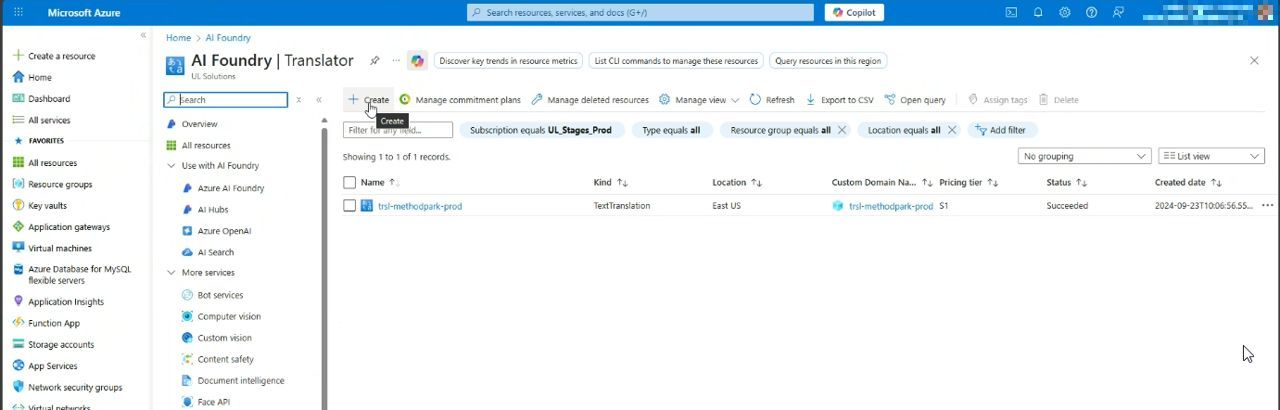
10. Define name and region:
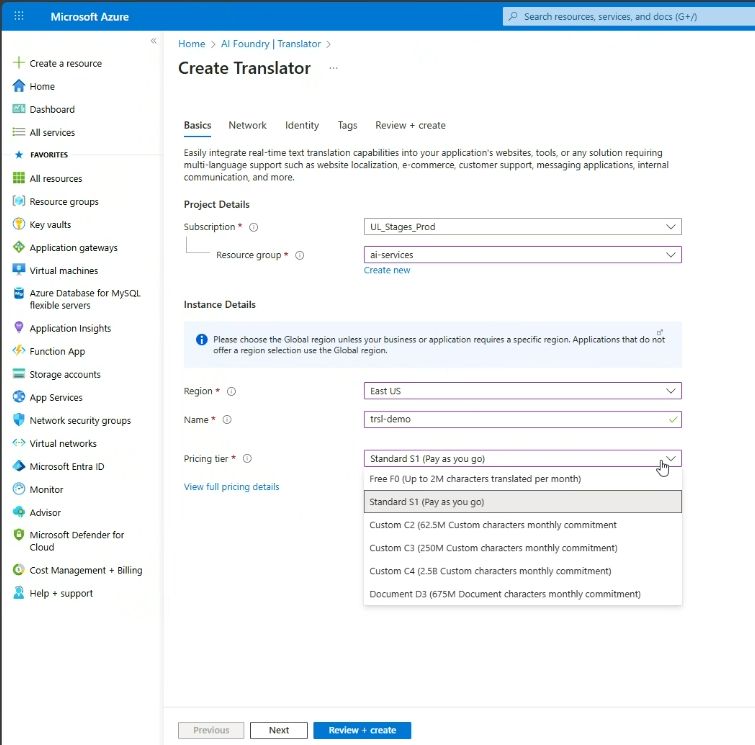
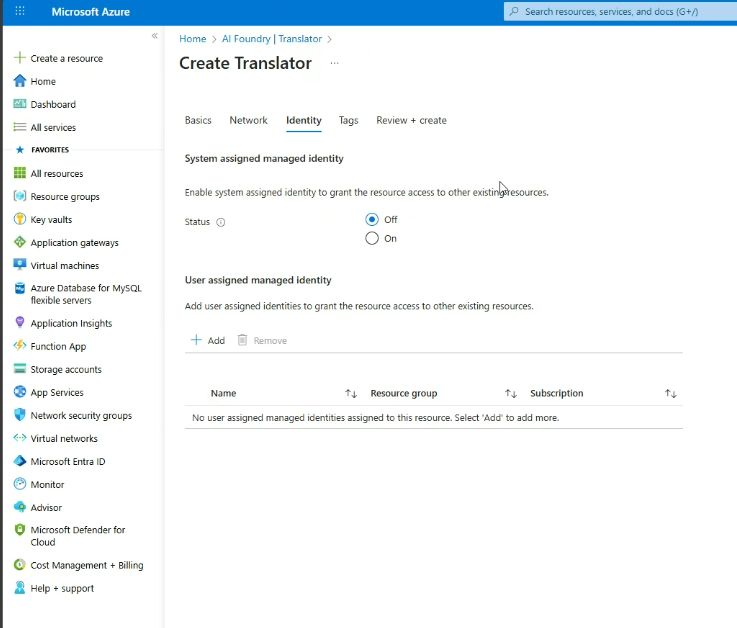
11. Leave system-identitiy-switch turned “off”:
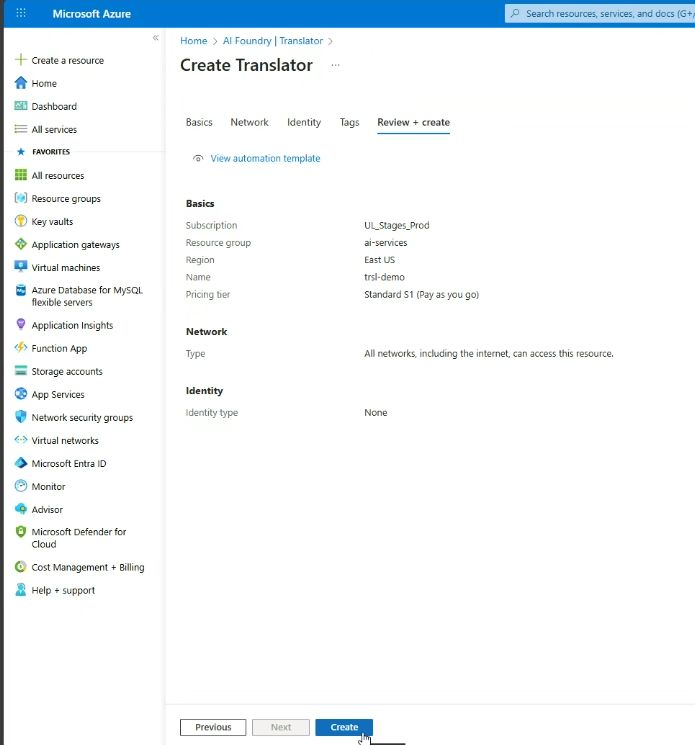
12. Create resource: click “Create”:
13. Export Stages access data (Key, Endpoint):
If you want to check if Stages can reach your AI resources please execute the command below in a command shell on the server that Stages is installed on:
Linux:
curl -X POST 'https://openai-methodpark-prod-msc-plc.openai.azure.com/openai/deployments/gpt-4o-mini/chat/completions?api-version=2025-01-01-preview' -H 'Content-Type: application/json' -H 'api-key: xxxxxxx' -d '{ "messages": [ { "role": "user", "content": "Hello" } ], "max_tokens": 1 }'
Windows:
curl -X POST "https://openai-methodpark-prod-msc-plc.openai.azure.com/openai/deployments/gpt-4o-mini/chat/completions?api-version=2025-01-01-preview" -H "Content-Type: application/json" -H "api-key: xxxxxxx" -d "{ \"messages\": [ { \"role\": \"user\", \"content\": \"Hello\" } ], \"max_tokens\": 1 }"
If a Proxy is being used add the following parameters to the curl command:
--proxy "http://ROXYSERVER:PORT"
--proxy-user "USERNAME:PASSWORD"
AI Feature Proxy Configuration: How to use HTTP proxies with AI Ressources
To use a proxy for connecting to ai ressources, the following configuration has to be added to the conf/config.xml file
! This has been introduced with Stages 7.12.4.1 !
<proxies>
  <proxy-host ident="<proxy_ident>" hostName="<proxy_host>" port="<the_port_the_proxy_listens_on>">
  <!-- if required by the proxy, username and password can be provided -->
    <proxy-property name="username" value="<username>"/>
    <proxy-property name="password" value="<password>"/>
  </proxy-host>
</proxies>
To use the proxy configuration with the Stages AI configuration the proxy property has to be added to ALL the affected cg-hosts:
<cg-property name="proxy" value="<proxy_ident>" />
All affected cg-host sections should look like this afterwards:
<cg-host ident="chatModel" url="${ai.model.url}" displayName="dummy_display_name">
  <cg-property name="user" ... />
  <cg-property name="key" .../>
  <cg-property name="deployment_name" ... />

  <cg-property name="proxy" value="<proxy_ident>" />
<cg-host/>
AI Feature Tokenizer Configuration
LLM that are NOT using the standard byte-pair-encoding algorithm CANNOT be used with the Azure tokenizer. Stages implements the HuggingFaceTokenizer from deep java library to support customized tokenizer.
Add the property “tokenizerFolder” to the cg-host section
 <cg-host ident="custom-model-ident" url="${ai.model.url}" displayName="custom-model">
  <cg-property name=".... />
  <cg-property name="tokenizerFolder" value="custom-model-v1"/>
</cg-host>
In methodpark\stages\conf
Create a folder tokenizer\custom-model-v1 ← make sure the folder name exactly matches the value in the tokenizerFolder property
Add tokenizer.json and tokenizer_config.json
Example for using DeepSeek V3.2
1. cg-host configuration in config.xml
<cg-type name="openAICompatible">
 <cg-host ident="training-model" url="${ai.model.url}" displayName="DeepSeek V3.2 for Chat">
  <cg-property name="deployment_name" value="DeepSeek_V3_2"/>
  <cg-property name="tokenizerFolder" value="DeepSeek_V3_2"/>
  ...
</cg-host>
<cg-type />
2. chatbot configuration in config.xml
You need to change all chatbot steps that shall use the configured LLM
default:
<chatbot-step ident="summaries" type="azureOpenAI" host="gpt-4o-mini">

custom configuration:
<chatbot-step ident="summaries" type="openAICompatible" host="training-model">
3. Add tokenizer configuration:
As the custom models are not processed by the standard azure tokenizer, there has to be a custom configuration added and put into a folder in conf/tokenizer that matches the config.xml (e.g. conf/tokenizer/DeepSeek_V3_2). The custom tokenizer can use tokenizer.json and tokenizer_config.json files.
For lots of models various configurations can be downloaded from Huggingface.co, e.g.:
To make the tokenizer_config.json work with Stages a few small adjustments have to be made
In tokenizer_config.json look up objects (e.g. bos_token) and just use the value from the “content” attribute value instead of the whole object. See the following file examples:
Original tokenizer_config.json :
{
  "add_bos_token": true,
  "add_eos_token": false,
  "bos_token": {
    "__type": "AddedToken",
    "content": "<|begin▁of▁sentence|>",
    "lstrip": false,
    "normalized": true,
    "rstrip": false,
    "single_word": false
  },
  "clean_up_tokenization_spaces": false,
  "eos_token": {
    "__type": "AddedToken",
    "content": "<|end▁of▁sentence|>",
    "lstrip": false,
    "normalized": true,
    "rstrip": false,
    "single_word": false
  },
  "legacy": true,
  "model_max_length": 16384,
  "pad_token": {
    "__type": "AddedToken",
    "content": "<|end▁of▁sentence|>",
    "lstrip": false,
    "normalized": true,
    "rstrip": false,
    "single_word": false
  },
  "sp_model_kwargs": {},
  "unk_token": null,
  "tokenizer_class": "LlamaTokenizerFast",
  "chat_template": "{% if not add_generation_prompt is defined %}{% set add_generation_prompt = false %}{% endif %}{% set ns = namespace(is_first=false, is_tool=false, is_output_first=true, system_prompt='', is_first_sp=true) %}{%- for message in messages %}{%- if message['role'] == 'system' %}{%- if ns.is_first_sp %}{% set ns.system_prompt = ns.system_prompt + message['content'] %}{% set ns.is_first_sp = false %}{%- else %}{% set ns.system_prompt = ns.system_prompt + '\\n\\n' + message['content'] %}{%- endif %}{%- endif %}{%- endfor %}{{ bos_token }}{{ ns.system_prompt }}{%- for message in messages %}{%- if message['role'] == 'user' %}{%- set ns.is_tool = false -%}{{'<|User|>' + message['content']}}{%- endif %}{%- if message['role'] == 'assistant' and 'tool_calls' in message %}{%- set ns.is_tool = false -%}{%- for tool in message['tool_calls'] %}{%- if not ns.is_first %}{%- if message['content'] is none %}{{'<|Assistant|><|tool▁calls▁begin|><|tool▁call▁begin|>' + tool['type'] + '<|tool▁sep|>' + tool['function']['name'] + '\\n' + '```json' + '\\n' + tool['function']['arguments'] + '\\n' + '```' + '<|tool▁call▁end|>'}}{%- else %}{{'<|Assistant|>' + message['content'] + '<|tool▁calls▁begin|><|tool▁call▁begin|>' + tool['type'] + '<|tool▁sep|>' + tool['function']['name'] + '\\n' + '```json' + '\\n' + tool['function']['arguments'] + '\\n' + '```' + '<|tool▁call▁end|>'}}{%- endif %}{%- set ns.is_first = true -%}{%- else %}{{'\\n' + '<|tool▁call▁begin|>' + tool['type'] + '<|tool▁sep|>' + tool['function']['name'] + '\\n' + '```json' + '\\n' + tool['function']['arguments'] + '\\n' + '```' + '<|tool▁call▁end|>'}}{%- endif %}{%- endfor %}{{'<|tool▁calls▁end|><|end▁of▁sentence|>'}}{%- endif %}{%- if message['role'] == 'assistant' and 'tool_calls' not in message %}{%- if ns.is_tool %}{{'<|tool▁outputs▁end|>' + message['content'] + '<|end▁of▁sentence|>'}}{%- set ns.is_tool = false -%}{%- else %}{% set content = message['content'] %}{% if '</think>' in content %}{% set content = content.split('</think>')[-1] %}{% endif %}{{'<|Assistant|>' + content + '<|end▁of▁sentence|>'}}{%- endif %}{%- endif %}{%- if message['role'] == 'tool' %}{%- set ns.is_tool = true -%}{%- if ns.is_output_first %}{{'<|tool▁outputs▁begin|><|tool▁output▁begin|>' + message['content'] + '<|tool▁output▁end|>'}}{%- set ns.is_output_first = false %}{%- else %}{{'<|tool▁output▁begin|>' + message['content'] + '<|tool▁output▁end|>'}}{%- endif %}{%- endif %}{%- endfor -%}{% if ns.is_tool %}{{'<|tool▁outputs▁end|>'}}{% endif %}{% if add_generation_prompt and not ns.is_tool %}{{'<|Assistant|><think>\\n'}}{% endif %}"
}
Updated tokenizer_config.json
{
  "add_bos_token": true,
  "add_eos_token": false,
  "bos_token": "<|begin▁of▁sentence|>",
  "clean_up_tokenization_spaces": false,
  "eos_token": "<|end▁of▁sentence|>",
  "legacy": true,
  "model_max_length": 16384,
  "pad_token": "<|end▁of▁sentence|>",
  "unk_token": null,
  "tokenizer_class": "LlamaTokenizerFast",
  "chat_template": "{% if not add_generation_prompt is defined %}{% set add_generation_prompt = false %}{% endif %}{% set ns = namespace(is_first=false, is_tool=false, is_output_first=true, system_prompt='', is_first_sp=true) %}{%- for message in messages %}{%- if message['role'] == 'system' %}{%- if ns.is_first_sp %}{% set ns.system_prompt = ns.system_prompt + message['content'] %}{% set ns.is_first_sp = false %}{%- else %}{% set ns.system_prompt = ns.system_prompt + '\\n\\n' + message['content'] %}{%- endif %}{%- endif %}{%- endfor %}{{ bos_token }}{{ ns.system_prompt }}{%- for message in messages %}{%- if message['role'] == 'user' %}{%- set ns.is_tool = false -%}{{'<|User|>' + message['content']}}{%- endif %}{%- if message['role'] == 'assistant' and 'tool_calls' in message %}{%- set ns.is_tool = false -%}{%- for tool in message['tool_calls'] %}{%- if not ns.is_first %}{%- if message['content'] is none %}{{'<|Assistant|><|tool▁calls▁begin|><|tool▁call▁begin|>' + tool['type'] + '<|tool▁sep|>' + tool['function']['name'] + '\\n' + '```json' + '\\n' + tool['function']['arguments'] + '\\n' + '```' + '<|tool▁call▁end|>'}}{%- else %}{{'<|Assistant|>' + message['content'] + '<|tool▁calls▁begin|><|tool▁call▁begin|>' + tool['type'] + '<|tool▁sep|>' + tool['function']['name'] + '\\n' + '```json' + '\\n' + tool['function']['arguments'] + '\\n' + '```' + '<|tool▁call▁end|>'}}{%- endif %}{%- set ns.is_first = true -%}{%- else %}{{'\\n' + '<|tool▁call▁begin|>' + tool['type'] + '<|tool▁sep|>' + tool['function']['name'] + '\\n' + '```json' + '\\n' + tool['function']['arguments'] + '\\n' + '```' + '<|tool▁call▁end|>'}}{%- endif %}{%- endfor %}{{'<|tool▁calls▁end|><|end▁of▁sentence|>'}}{%- endif %}{%- if message['role'] == 'assistant' and 'tool_calls' not in message %}{%- if ns.is_tool %}{{'<|tool▁outputs▁end|>' + message['content'] + '<|end▁of▁sentence|>'}}{%- set ns.is_tool = false -%}{%- else %}{% set content = message['content'] %}{% if '</think>' in content %}{% set content = content.split('</think>')[-1] %}{% endif %}{{'<|Assistant|>' + content + '<|end▁of▁sentence|>'}}{%- endif %}{%- endif %}{%- if message['role'] == 'tool' %}{%- set ns.is_tool = true -%}{%- if ns.is_output_first %}{{'<|tool▁outputs▁begin|><|tool▁output▁begin|>' + message['content'] + '<|tool▁output▁end|>'}}{%- set ns.is_output_first = false %}{%- else %}{{'<|tool▁output▁begin|>' + message['content'] + '<|tool▁output▁end|>'}}{%- endif %}{%- endif %}{%- endfor -%}{% if ns.is_tool %}{{'<|tool▁outputs▁end|>'}}{% endif %}{% if add_generation_prompt and not ns.is_tool %}{{'<|Assistant|><think>\\n'}}{% endif %}"
}